 Bookmark Sorter
What this is for
Sound familiar? Hundreds of bookmarks that have piled up in “Other bookmarks” over the years. In Chrome’s own bookmark manager you move everything one by one, in a single window, without seeing what’s behind a link.
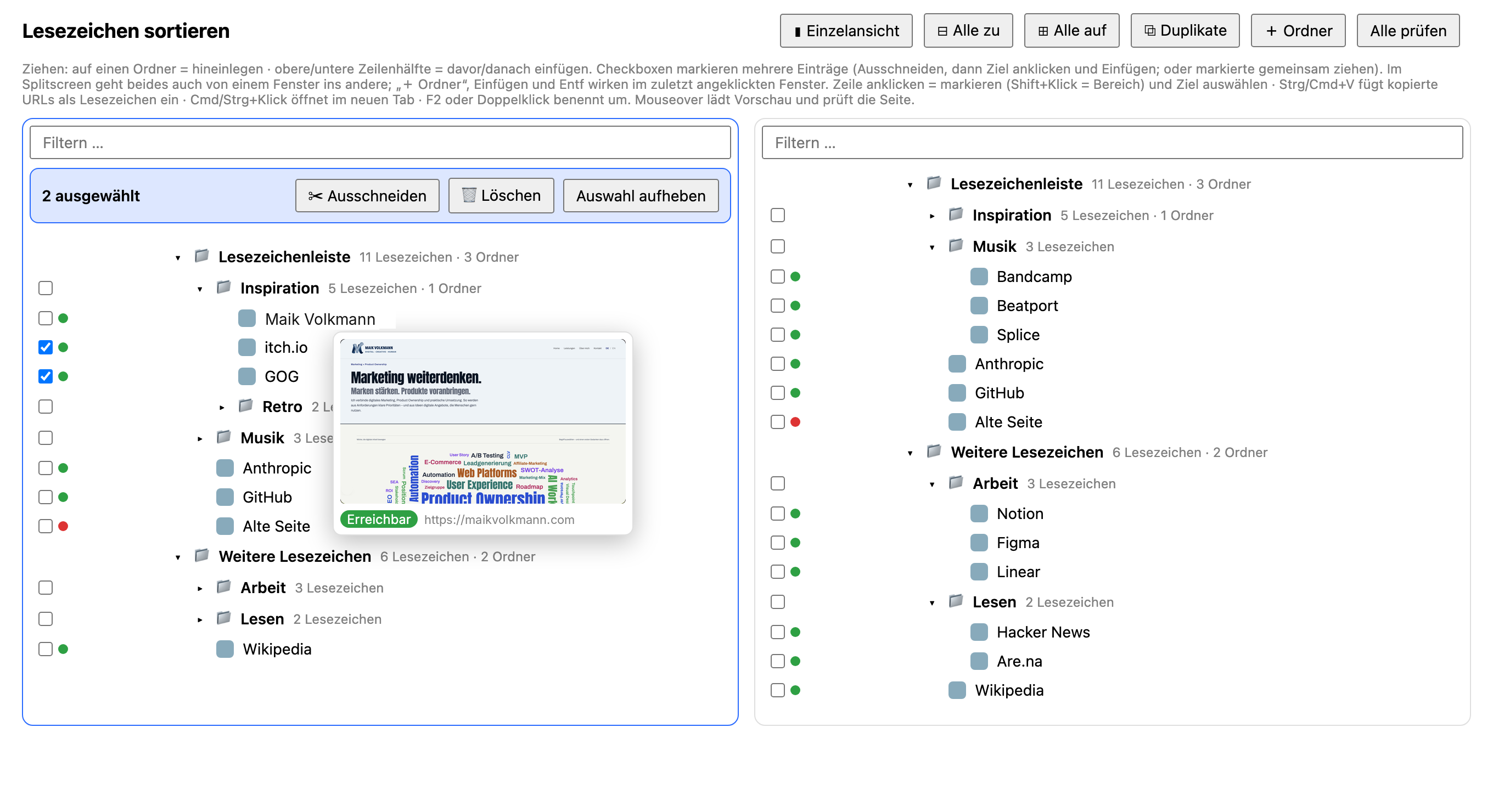
This tool works the way you sort files in Explorer or Finder: two panes side by side, the destination on the left, the source on the right, and you move things back and forth in between.
What’s inside
◫Split screen
Two bookmark trees side by side. Dragging, or cut and paste, also works from one pane to the other.
☑Multi-select
Click to select, Shift-click to select a range. You can drag, cut or delete everything selected at once.
🗂Folders under control
Create, rename, delete, expand or collapse all. Next to each folder you see how many bookmarks and subfolders it contains.
A↓A to Z
One click sorts a folder alphabetically, another restores the previous order.
🖼Preview and reachability
Hover over a bookmark: you see the page’s thumbnail and a status (reachable, error, unreachable). “Check all” (Alle prüfen) does this for the whole collection.
⧉Duplicates
Even when two links differ only in www., http or tracking parameters. You choose which one to keep in each group. Deleting can be undone.
📋Add via copy & paste
Copy a URL, paste it, done. The page title is fetched afterwards.
AI or by hand?
Of course you can let an AI sort your bookmarks. There are quite a few tools for that by now. But I find it more interesting to do it myself, and you need a system you can operate and understand yourself.
If you want to keep an overview, you sometimes prefer a tool you know from Explorer views: split window, moving items back and forth, sorting alphabetically. That’s exactly what I built this one for.
Free, and made to be built on
You can download and use the tool for free. And you may work with it: the code is open and deliberately kept simple, with no build step and no frameworks. Develop it further, adapt it to your needs, add the features you’re missing. If you like to organise your bookmarks by hand, this gives you a solid foundation that you can understand and change yourself.
Released under the MIT License: anyone may use, modify and share it, including commercially, as long as the attribution to me (Maik Volkmann) is kept. The license is included in the ZIP as the file LICENSE.
If you make something nice out of it, I’d be happy to hear from you: maikvolkmann.com.
How to install it (2 minutes)
- Download the ZIP and unzip it.
- In Chrome, open
chrome://extensionsand switch on Developer mode at the top right. - Choose Load unpacked and select the unzipped folder.
- Click the B icon in the toolbar. The manager opens in its own tab.
Download safely
An extension you load from a website instead of the Chrome Web Store deserves a check. That’s as it should be. Here’s what you can do:
- Read the source code. The extension consists of a few unencrypted files (HTML, CSS, JavaScript). Nothing is minified or hidden. Unzip the ZIP and open the files in a text editor.
- License. The extension is under the MIT License. You may use, modify and share it freely.
-
Compare the checksum. The SHA-256 checksum of the ZIP file is:In the terminal you check it with
4677eb03c4b783ccbd77a2cab864f60ce68998de2f48a52d90e569a53d1bbaf3shasum -a 256 Bookmark-Sort.zip. If it doesn’t match, the file has changed. - Virus scan. Upload the ZIP to VirusTotal or scan it with your antivirus software.
- Check the permissions. When you install it, Chrome shows what the extension may do. The explanation follows right below.
Which permission is needed for what?
| Permission | Purpose |
|---|---|
| Bookmarks | Showing, moving, renaming, deleting and creating your bookmarks. This is the core of the tool. |
| Access to websites (http/https) | Only for thumbnail, page title and reachability check: the extension fetches the URLs of your bookmarks directly. You trigger this by hovering or with “Check all” (Alle prüfen). |
| Storage (incl. unlimited) | Locally remembers thumbnails, status and the order before sorting. |
| Favicons | Shows the small site icons from Chrome’s own cache. |
There is no account, no server and no analytics. Your bookmarks never leave the browser. There is also no external screenshot service that would get to see your links.
Frequently asked questions
Does it cost anything?
No, it’s free, and you’re welcome to adapt and develop it further.
Can I adapt it for myself?
Yes, that’s what it’s for. The files are readable and there’s no build step. If you change something, reload the extension at chrome://extensions and the change applies immediately.
Why isn’t it in the Chrome Web Store?
It’s a private project that I share directly, without a store. As a result you don’t get updates automatically. You’ll find new versions on this page.
Does the tool change my bookmarks without asking?
No. It only changes what you trigger yourself. Deleted bookmarks can be restored right afterwards with “Undo” (Rückgängig), including after the duplicate cleanup. Deleting folders and deleting several selected entries ask for confirmation first and can’t be undone. Export your bookmarks from Chrome once beforehand as a backup (Bookmark Manager, three dots, “Export bookmarks”).
Does it sync with my Google account?
The tool works with Chrome’s regular bookmarks. If you use sync in Chrome, your changes are synced as usual.
Does it work in Edge, Brave or Arc?
I tested it in Chrome. Chromium-based browsers such as Edge, Brave or Arc should load it too, but I haven’t checked. Firefox and Safari don’t work; the extension doesn’t run there as is.
Is the extension available in English?
Not yet. This page is available in English, but the extension’s interface (buttons, menus, messages) is currently in German.
Clean up your bookmark chaos yourself.
Two panes, a few clicks, full control. Free, and you’re welcome to build on it to suit your needs.